

HOW TO USE
Every phone has a sweet spot for scanning with your ring. To make sharing smooth and reliable, we’ve outlined the ideal placement for each device below.

HELPFUL TIP
For the best experience, hold your ring in place for a few seconds when sharing. The connection is quick, and once you get the rhythm, it feels seamless. Use the guides below to see the ideal positioning for your device.
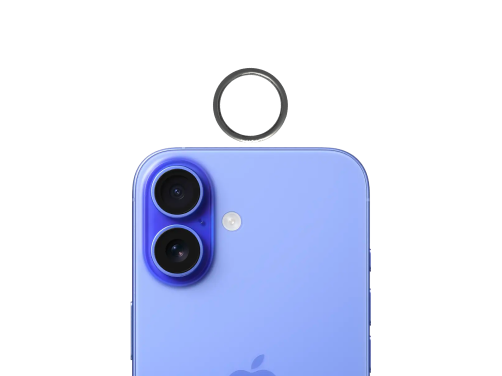
IPHONE
Position your ring flat along the top of your iPhone for a smooth, reliable read. Hold it in place for a moment to ensure instant connection.
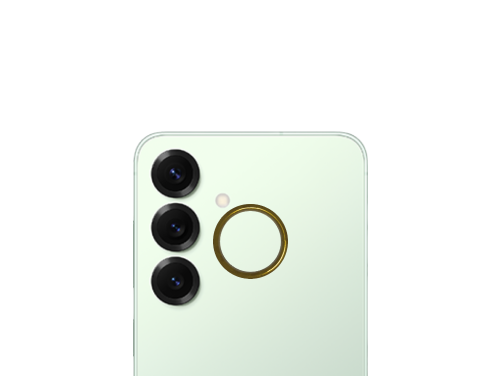
SAMSUNG
For Samsung, position your ring at the upper back of the phone, next to the camera. A brief hold will give you the most consistent results.
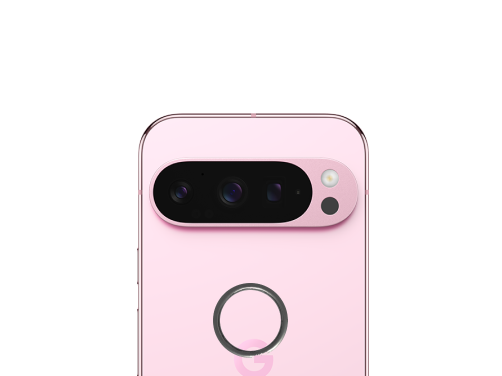
GOOGLE
For Google devices, position your ring above the logo on the lower back for the most reliable scan. Once you get the placement, it becomes effortless.